Why Matrix? Escaping Vendor Lock-in in Research Chat
Language: 日本語 / English
For: people who have heard of Matrix but are not sure why it is worth the switch. For the setup steps, see the setup checklist for new users.
Research chat is fragmented
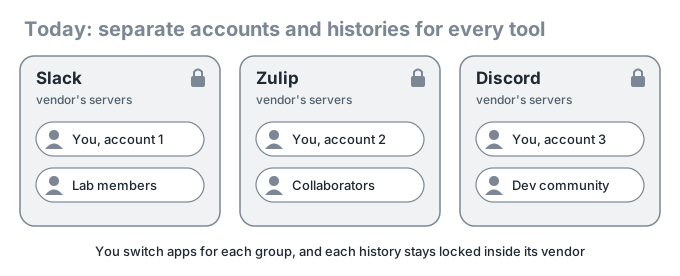
Every new collaboration seems to bring a new chat tool, and before messaging someone you first have to remember where you talk to them. What bothers me more is that each of these is a single vendor’s service.
- Pricing and free-plan terms change at the vendor’s discretion (many of us remember old messages disappearing from Slack’s free plan).
- The history lives on the vendor’s servers, and moving it elsewhere is hard.
- If you need a feature or a bug fix, you file a request and wait.
Research discussions are records we want to keep for years. Leaving them entirely to one company’s decisions is the problem I want to solve.
What Matrix is
Matrix is an open, decentralized chat protocol. The idea is close to email: create an account on any one of many servers (homeservers) around the world, and talk with people on other servers in the same rooms.
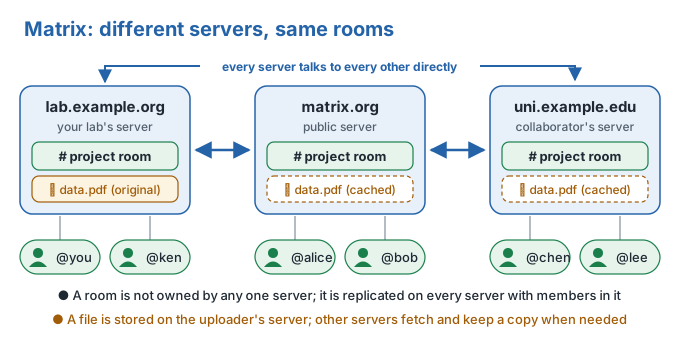
- Your ID looks like
@username:server; one is enough, like an email address. - A room is not owned by any single server. If the creator’s server goes down, members on other servers can keep talking.
- A file is stored on the uploader’s homeserver; other servers fetch and cache it when needed.
- Direct messages and private rooms are end-to-end encrypted by default, so servers store only ciphertext and administrators cannot read it.
- The protocol is open, so anyone can build clients (apps) and servers.
Users always keep the option to move to another server or switch clients. That is Matrix’s answer to vendor lock-in.
Your data can leave, too. Element can export a room’s chat as HTML, plain text, or JSON. Koushi can write out a room as JSON in Element’s format, together with the raw events (JSONL) and attachments.
Spaces: folders that group rooms
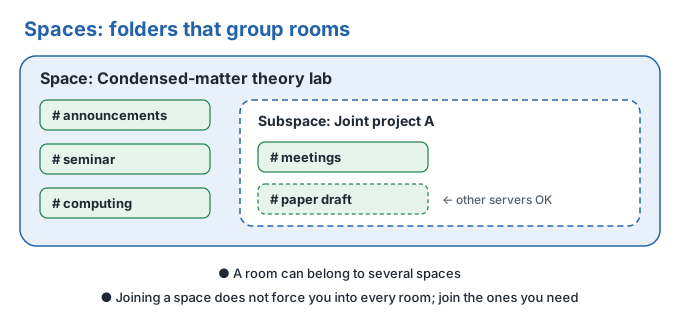
The closest thing to a Slack workspace is a space. But a space is only a bundle of rooms: spaces can be nested and can include rooms on other servers. Your lab’s space and your collaborations’ spaces sit side by side under one account, so you no longer need a separate account per tool.
Research institutions already rely on it
Research institutions and universities, mainly in Europe, have adopted Matrix as their official chat platform. Each runs its own homeserver and still talks with outside researchers across servers.
Max Planck Society, Fritz Haber Institute, Helmholtz Association, German Aerospace Center (DLR), Forschungszentrum Jülich, GFZ Helmholtz Centre for Geosciences, CISPA Helmholtz Center for Information Security, TU Wien, ETH Zürich Department of Physics, Karlsruhe Institute of Technology (KIT), TU Dresden, Technical University of Munich (TUM), TU Berlin, LMU Munich, TU Darmstadt, University of Augsburg Institute of Physics, University of Strasbourg, New York University (HSRN VIP), University of Twente (Studenten Net Twente).
Why it has been slow to spread in Asia
Adoption in Asia has lagged behind Europe and North America, for two main reasons.
The first is support for non-Latin scripts. The ecosystem has been driven mostly by developers in Europe and North America, and Chinese, Japanese, and Korean (CJK) text tended to be an afterthought. In Element Desktop, the official client, searching Japanese text, which has no spaces between words, often failed to find messages that clearly contained the word.
My fixes for this (Seshat #150, Element #33048) have been merged, and since Element Desktop 1.12.30 (September 2026) you can choose an n-gram search index. The default is still the old, language-based mode, though. Go to Settings → Security & Privacy → Message search → Manage, and set “Search tokenizer mode” to “N-gram” (the index is rebuilt automatically).
The second is that the security settings are hard to understand. Encryption is so flexible that newcomers do not know what to set up. They skip the recovery key or device verification, and later find that a new device cannot read their past messages.
Both are client problems, not protocol problems. And that is what is now changing.
AI coding agents made building clients feasible
Building a chat client with end-to-end encryption used to be a job for a dedicated team. Now official SDKs such as matrix-rust-sdk handle encryption and sync, and you build the interface together with AI coding agents such as Claude Code and Codex. A wave of new clients has appeared in 2026.
- Koushi: a desktop client I am building with AI coding agents, tackling CJK input and search and confusing security setup (see below).
- Komai: a desktop client from etke.cc, openly built together with AI coding agents.
- Others include Mactrix, Relay, Lightning, and SchildiChat Revenge (client list).
If Japanese search does not work in Slack, all we can do is file a request. With Matrix, we can build a client that fixes it and keep using the same account.
You can run your own homeserver
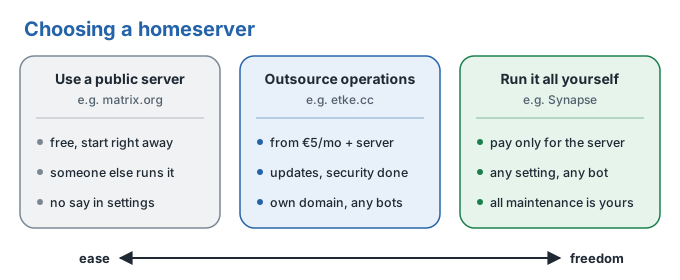
A public server such as matrix.org is fine to start with. For a lab or a group, you can also have your own homeserver. I run my own.
If running a server sounds daunting, etke.cc will do it for you: they set up the full Matrix stack on a server (VPS) you rent and keep it updated and secure every week, starting at 5 euros a month (as of October 2026, server cost not included). They can also provide the server. The deployment configuration is open source, so you can take over operations yourself later.
Your own server gives you much more freedom. Take bots: a Matrix bot is just an ordinary account, so it is easy to write one in Python (matrix-nio) or other languages. Job-completion notices from compute clusters, new-paper alerts, connections to AI agents: you can add the tools your lab needs yourselves.
Where newcomers get stuck
This section explains only why things work the way they do. For the actual steps, see the setup checklist for new users.
Logging in: which server is your account on?
When a login screen asks for your homeserver, enter the part of your ID @username:server after the colon (matrix.org if you signed up there). To create an account, the most reliable route is Element Web in a browser.
Your password and your recovery key are different things
This is the biggest pitfall.
- Your password lets you log in.
- Your recovery key unlocks the encrypted backup of your message keys stored on the server.
The recovery key is never stored on the server, so the server administrator cannot recover it for you (which is exactly why they cannot read your messages). Create a recovery key right after you create your account, and keep it in a password manager or similar.
Always verify your own devices; you rarely need to verify other people
Matrix uses the word “verify” for two things with the same name but completely different purposes.
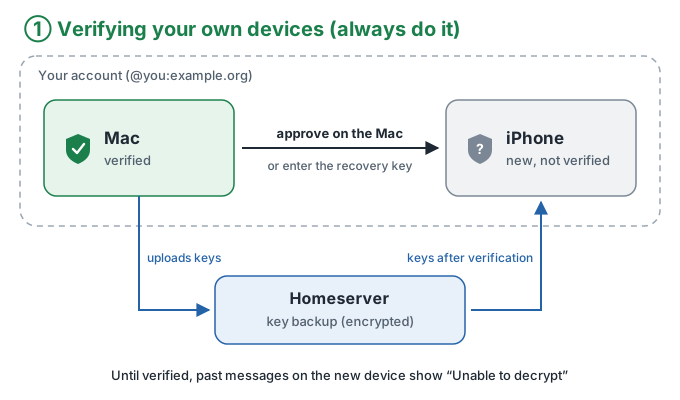
Always verify your own devices. Skipping it causes real problems.
- Keys do not arrive, so messages cannot be decrypted. On a new device every past message shows “Unable to decrypt.” Nothing is broken; the device simply has not received the keys.
- Other people see warnings. Depending on their settings, that device will not receive keys for new messages either.
When you log in on a new device, enter your recovery key or approve it from another verified device. It takes seconds.
If you forget or lose your recovery key, start the recovery procedure immediately.
Before logging out of any device or deleting the app, work through the safety and recovery checklist for existing users from the top. A logged-in device may be the last place holding keys that have not been backed up.
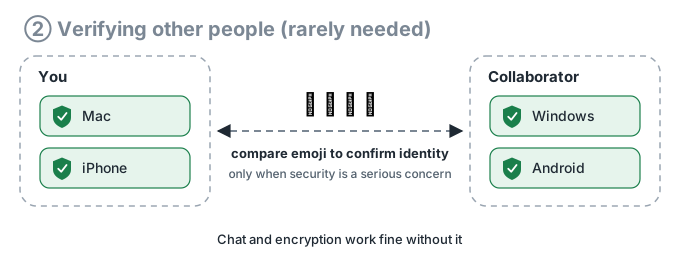
You rarely need to verify other people. It is how you confirm that the person you are talking to is genuine and not an impersonator, by comparing emoji in person or on a call. It has nothing to do with handing over keys, so chat and encryption work normally without it. Use it only when security is a serious concern, such as when handling highly confidential information.
Koushi
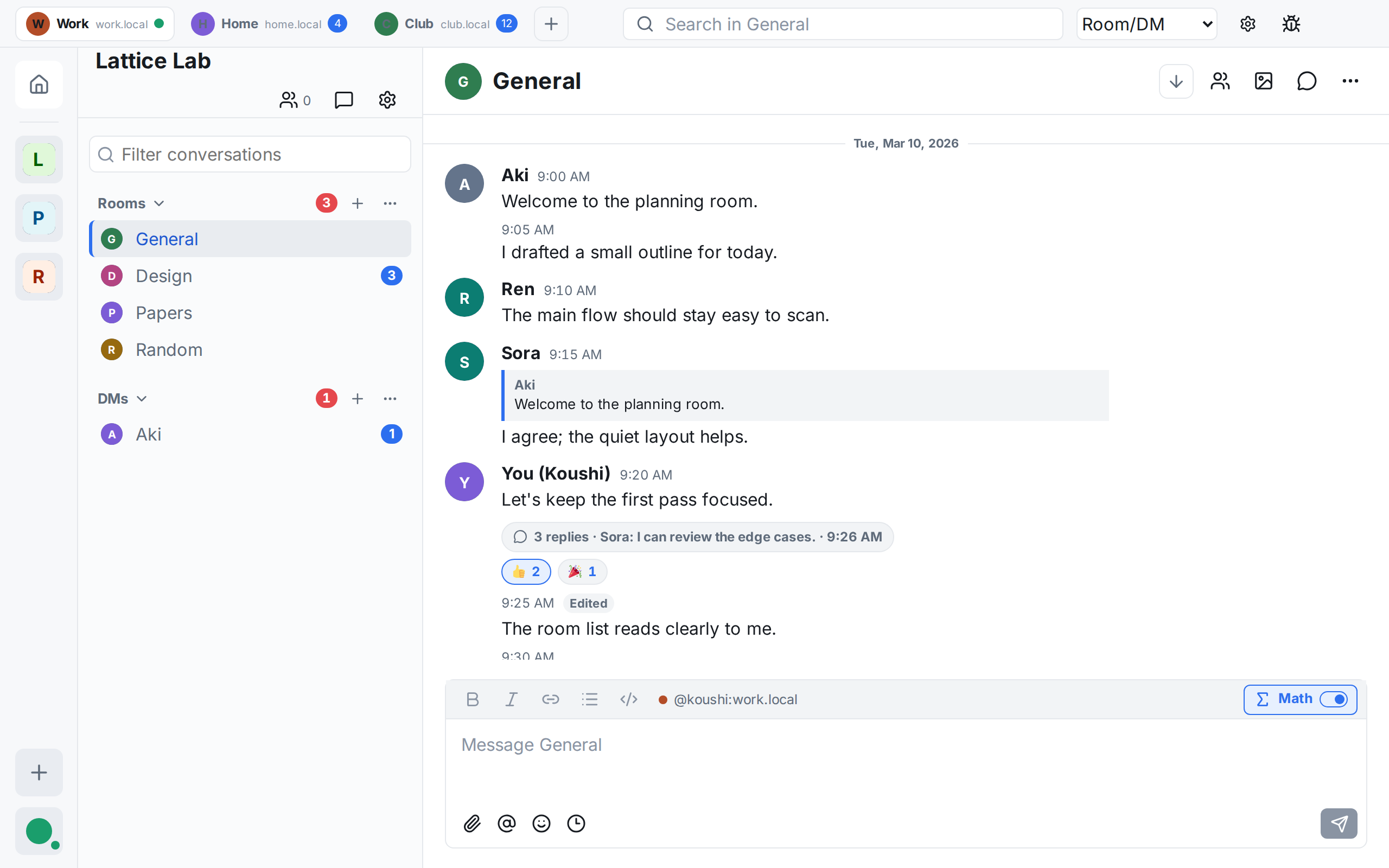
Koushi is a desktop Matrix client that I am building together with AI coding agents. The name is a Japanese pun: kōshi means both “photon” (光子), which carries the signal, and “lattice” (格子), a nod to Matrix. It is open source under MIT / Apache-2.0.
I turned my frustrations with existing clients into design goals.
- Works properly in CJK. Pressing Enter to confirm an IME conversion does not send the message. Text without spaces between words can be found in encrypted history. Full-width and half-width characters are treated alike.
- Several accounts in one window. Keep, say, your lab’s account and your matrix.org account side by side in tabs.
- What research discussions need. Markdown, code blocks, LaTeX-style math, and threads.
- Secure setup you cannot skip. The chat view does not open until the device is verified and key backup is set up. Verifying other people is optional, and Koushi does not warn you merely for skipping it.
- Your data can leave. Export a room’s history as Element-compatible JSON, with raw events and attachments.
macOS (Apple Silicon) is officially supported, and a signed, notarized DMG is available from Releases. Some people build and use it on Windows and Linux, but it has not been tested enough there yet. If you can test, report bugs, or contribute, you are very welcome.
Voice and video calls, screen sharing, bots, and widgets are not supported yet. Since Koushi is still under development, please also keep Element X signed in to the same account. Questions and requests are welcome in the public room #koushi-matrix:matrix.org.
Getting started
- Install a client (Element X or Koushi on a Mac, Element on Windows, Element X on a phone).
- Create an account.
- Create and save a recovery key right away.
- Log in on a second device and verify it with the recovery key.
The setup checklist for new users walks through these steps.
Closing thoughts
Chat is the record of our research discussions. I want us to choose where that record lives, rather than leave it to a vendor. Matrix is a practical way to do that, and it is already standard infrastructure at many European research institutions.
Its weak points, such as support for Asian languages and confusing settings, can now be fixed from the user side thanks to AI coding agents. I would like to see Matrix spread among researchers in Asia as well. Please get a Matrix ID and use it as a contact for your collaborations.